
Ditch your printer. Pitch from iPads
Deliver your deck from synced iPads that follow your page turns, navigate seamlessly across multiple PDFs, leave with a meeting record for easy follow-up and compliance, and never again scramble to find a printer for last-minute changes.

Features
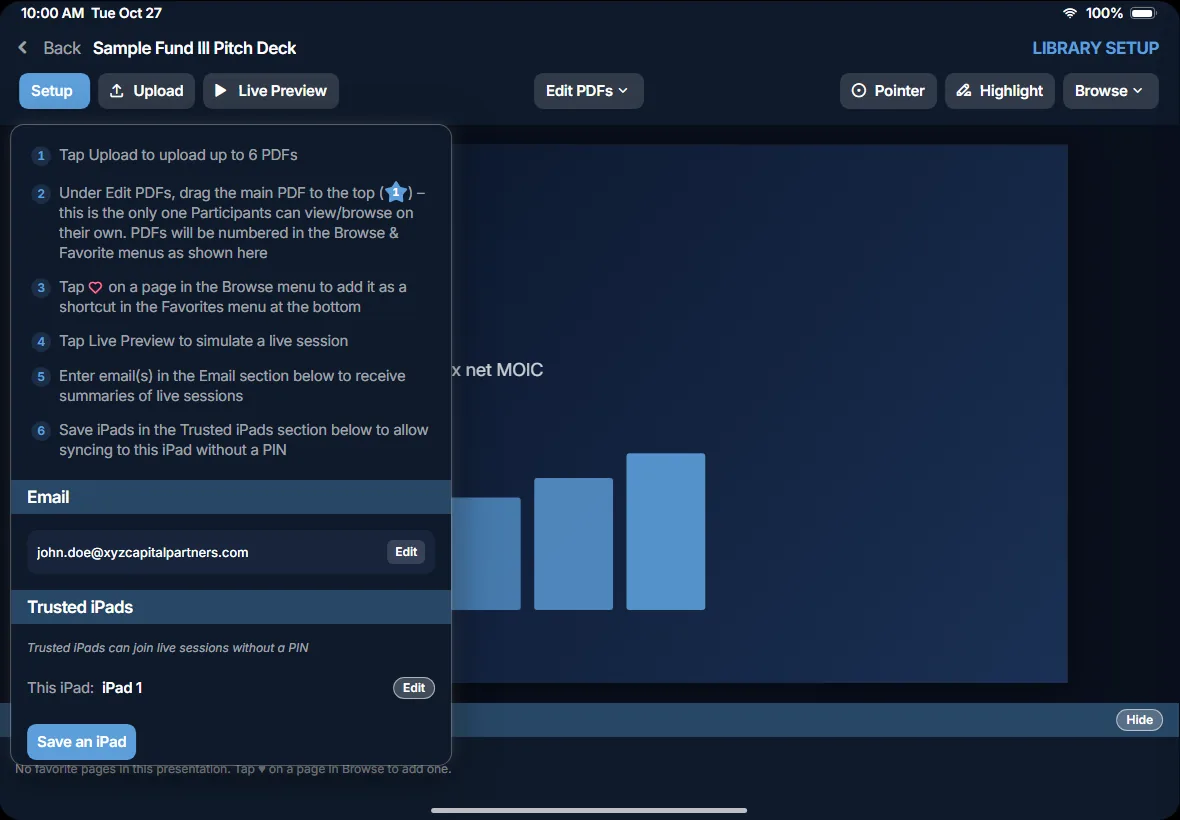
Library Setup
- Upload up to 6 PDFsHave your main presentation + supplemental docs ready to share if needed
- Tag the Main PresentationParticipants can browse only this one; others show only when you share them
- Favorite Key Pages across PDFsThey become one-tap shortcuts you can jump to without flipping through an entire PDF
- Save Trusted iPadsYour own iPads can sync without a PIN, and any of them can host.
- Rehearse with Live PreviewPractice transitioning across documents before the meeting
Present with control
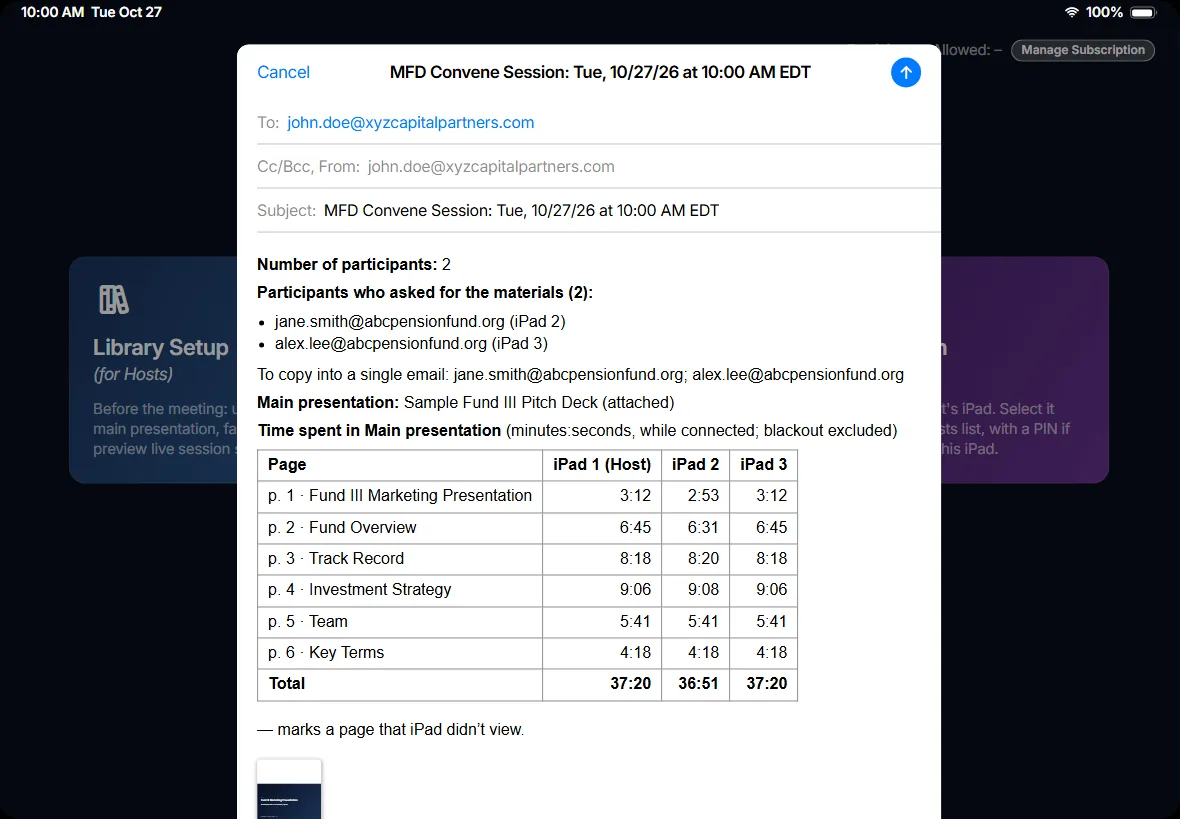
- Start a Live SessionAll iPads follow the Host’s room view – zoom in, highlight, & page flip for everyone
- No Internet NeedediPads connect directly through Wi-Fi but don’t need an internet connection
- Room PanelSee who’s following you vs. browsing, share to a TV, or get the session PIN
- BlackoutPauses every screen at once
Join in Seconds
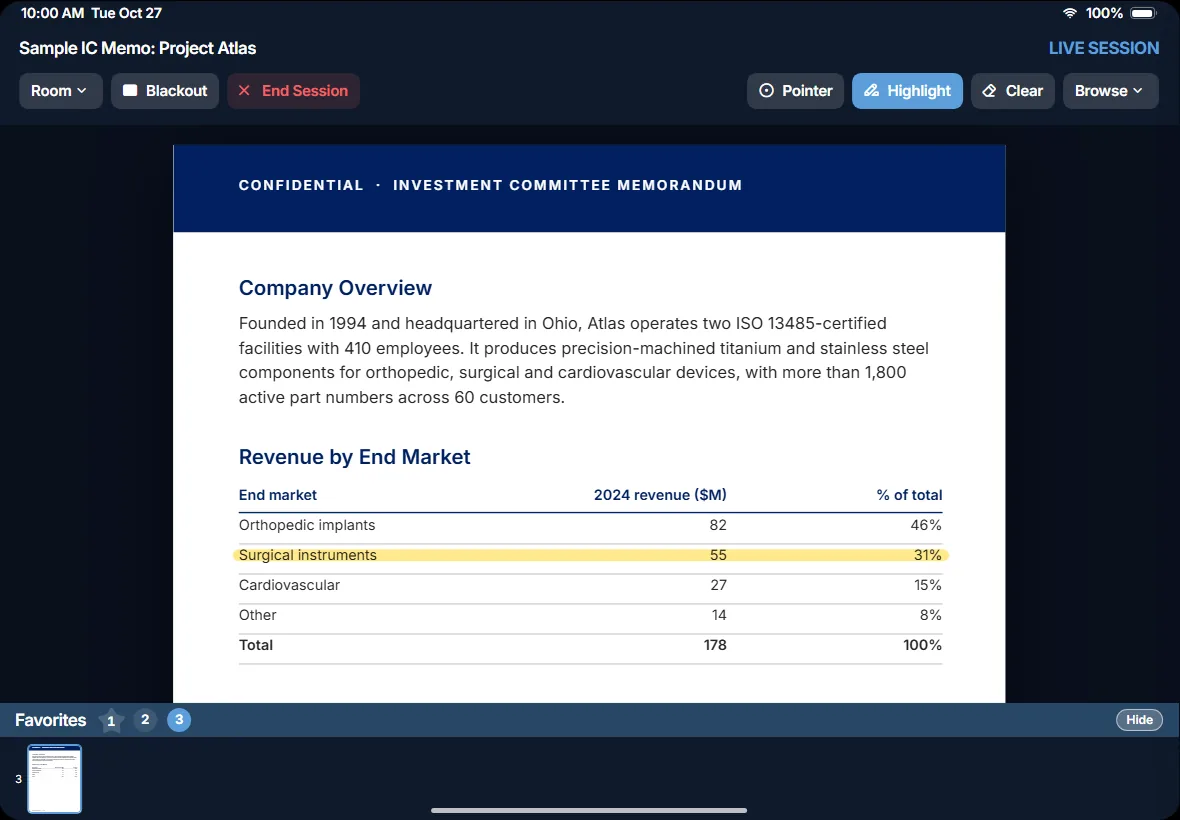
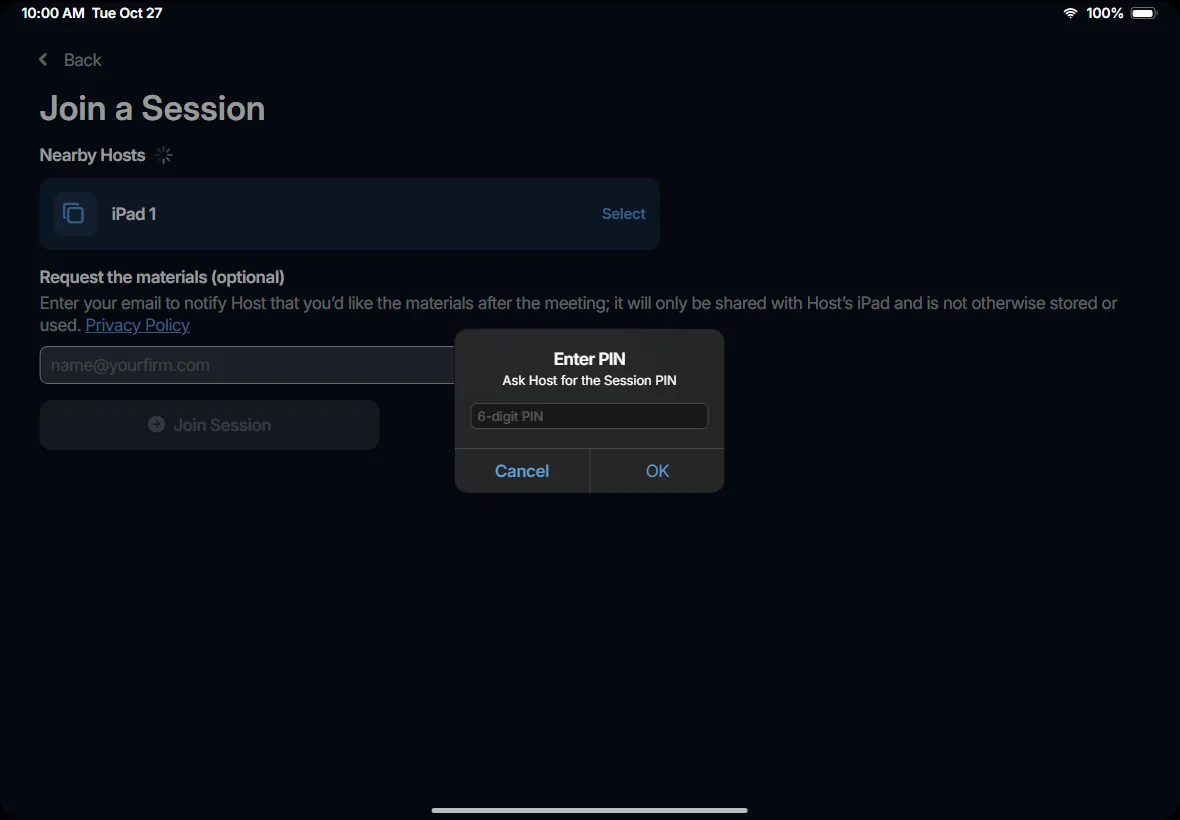
- Follow or BrowseAll iPads follow the Host by default, but Participants can browse the main presentation freely & resync to the Host at any time
- Request the MaterialsParticipants can opt to share their email to notify the Host that they’d like to receive materials after the meeting
- Emails Are Not StoredParticipant emails are locally shared directly to the Host’s iPad and cannot be accessed by MFD Convene
- Nothing Left BehindThe materials are cleared from Participant iPads when a live session ends
The Host’s meeting record
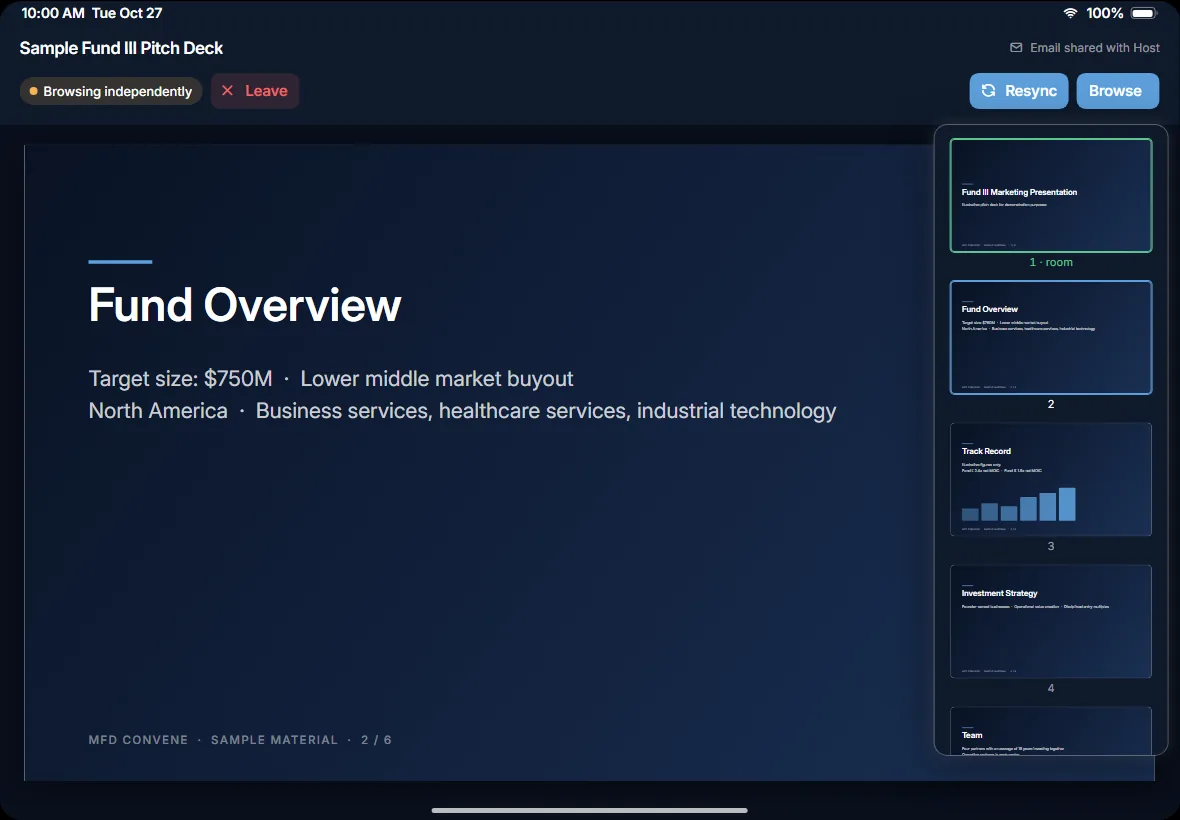
- Session SummaryPrepared after each live session - email it to yourself, save it as a PDF, or both / neither
- What It IncludesHow many iPads joined, who requested the materials & time spent in the main presentation
- Track Last-Minute ChangesUpdated your main presentation between meetings? The session summary attaches the version that was shared in each live session so you can track who saw which version
Designed with compliance in mind
- Nothing Kept by MFD ConvenePDFs and emails stay local on iPads; MFD Convene does not collect, store or transmit your data
- Controlled, Encrypted JoiningThe connection between iPads is always encrypted, with a key from your session PIN or your Trusted iPads. Only your Trusted iPads can join live sessions without a PIN
- Materials Cleared after Every SessionMaterials only remain on iPads that serve as live session Host, all other iPads are cleared of materials when each session ends
- Track What Was SharedSession summaries include a copy of the main presentation shared in each live session
Pricing
Coming soon to the App Store. Download for free and try any individual tier with a one-week trial (no credit card required)
/month, billed annually
/month, billed annually
/month, billed annually
MFD Convene Privacy Policy
Last updated: October 30, 2026
About this policy
MFD Advisory, LLC makes the MFD Convene iPad app. This policy describes the information the app and this website use and what happens to it. The MFD Convene app has no user accounts and sends no information to MFD Advisory or anyone else.
How the app works
One iPad (the Host) presents PDFs, and other iPads in the same room (Participants) follow along. The iPads connect directly to each other over a local wireless connection; no internet connection is used. The app contains no analytics, advertising or tracking.
Information on the Host iPad
The Host iPad stores the PDFs the Host uploads, the pages marked as favorites, up to three email addresses for session summaries, and its list of trusted iPads. These stay on the Host iPad until the Host deletes them or deletes the app.
Information during a session
The Host iPad sends its PDFs and the page being shown to the Participant iPads. Each Participant iPad tells the Host iPad which page it is on.
If the Host requests emails, a Participant can enter an email address. This is optional, and the address is sent only to the Host iPad.
Each iPad’s name is visible to the other iPads in the session. While a session is running, the Host iPad’s name is also visible to nearby iPads looking for a session to join. Each installation of the app has a random identifier, which it shares with the iPads it connects to.
Information on Participant iPads
Participant iPads keep nothing after a session. Everything received from the Host iPad is deleted when the session ends or the Participant leaves. If the connection to the Host iPad is lost for more than 30 seconds, the session ends on that iPad and everything is deleted.
Session summaries
After a session, the Host iPad creates a summary: the number of iPads that joined, any email addresses Participants entered, and the time each iPad spent on each page of the main presentation. The Host can send it from their own email account using Apple’s Mail app, share it as a PDF using another app, or delete it. The summary is not saved on the iPad.
Security
Connections between iPads are encrypted. An iPad can join a session only with the session’s PIN, or if the Host has saved it as a trusted iPad. No iPad can join after the Host ends the session.
Permissions
The app asks for Local Network access, to connect to the other iPads in the room. It can be turned off in Settings > MFD Convene; the app then can’t host or join sessions.
This website
The MFD Convene website counts visits with Cloudflare Web Analytics, which uses no cookies. After you click Accept in the cookie banner on the website, it also uses cookies, through Cloudflare Zaraz, to understand how visitors use the site and to improve our services and marketing.
If you request a demo, join the waitlist or ask to be notified at launch, the name, email address and notes you enter are sent to MFD Advisory by email through Web3Forms, our form provider, and used to respond to you.
Children
MFD Convene is not directed to children under 13.
Changes to this policy
Changes to this policy will be posted on this page with a new date.
Contact
Questions about this policy: [email protected].
MFD Convene Terms of Service
Effective November 2026. These terms are between you and MFD Advisory, LLC (“we”) and apply alongside Apple’s Licensed Application End User License Agreement.
Using MFD Convene
You may use MFD Convene to present documents to iPads in the same room and to create session summaries. You’re responsible for the documents you load and share, including having the right to share them and meeting any confidentiality obligations that apply to them. You’re also responsible for how you use the email addresses Participants share with you.
Acceptable use
- Don’t use MFD Convene to share unlawful content or content you aren’t permitted to share.
- Don’t interfere with, overload or try to get around the security of MFD Convene.
- Don’t use email addresses received through MFD Convene to send unsolicited email.
Subscriptions
Paid plans are bought and managed on our website through Paddle, our payment provider, which handles billing. Plans are billed annually and renew until you cancel. Each individual plan can be tried free for one week, with no credit card required.
Disclaimers
MFD Convene is provided “as is.” We work to keep it reliable and secure but don’t guarantee it will be uninterrupted or error-free.
Limitation of liability
To the extent the law allows, we aren’t liable for indirect or consequential losses, and our total liability is limited to the amount you paid for MFD Convene in the 12 months before the claim.
Ending use
You can stop using MFD Convene at any time.
General
These terms are governed by the laws of the District of Columbia. We may update them; continued use after an update means you accept it. Contact: [email protected].